Features
Everything PassHulk does, explained.
Start with the three things people use every day, watch how they work, then see every other feature at a glance. All of it is included in every plan.
01
Save a login with a strong password in seconds.
Add the website and your username, pick a password from the built-in generator, and save. It is encrypted on your device and appears on your other devices right away.
- Generator built into the form: password, passphrase or PIN
- Strength meter shows how hard it is to guess
- Website, username, notes, folder and 2FA key in one place
- Encrypted on your device before it is saved
02
Find weak passwords, and fix them one click at a time.
Vault health gives your passwords one simple score and a short list of what to fix first. Click “Change password”, open the website, and save a strong new one.
- One score for your whole vault, worked out on your device
- Spots weak, reused and old passwords
- Optional leak check against known data breaches
- “Fix these first” list, most important on top
03
Sign in with one click, on every site.
The PassHulk browser extension recognises the sign-in page and fills in the right login. If you have several, pick one from the PassHulk icon in the field.
- Chrome, Microsoft Edge and Firefox
- Fills by itself when exactly one login matches the site
- Offers to save new logins and update changed passwords
- Fills 2FA codes too, and never submits the form for you
NewPasskeys
Sign in with a passkey. No password to type.
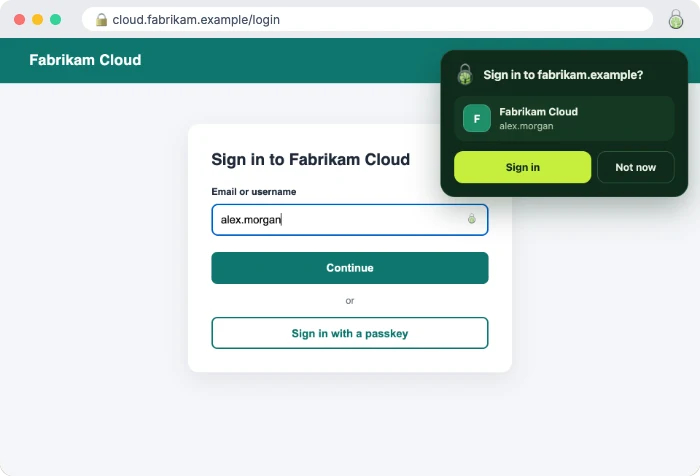
More and more websites let you sign in with a passkey instead of a password. PassHulk saves them in your vault, so you can sign in with one click on any computer or phone where you use PassHulk.
- Save: when a website offers a passkey, PassHulk asks to keep it.
- Sign in: next time, choose it from PassHulk and you’re in.
- Manage: see and remove passkeys in your vault.
- Protected: locked like your passwords, and only offered on the site it belongs to.
Works in the Chrome, Edge and Firefox extensions, and in the iPhone, Mac and Android apps.
Every feature
All of it, at a glance.
Included in the Individual and the Family plan, on the web, in your browser, on your phone and on your Mac.
Your vault
One safe place for everything private
14 kinds of items
Not just passwords. Keep all the private details you would otherwise write down.
2FA codes built in
The 6-digit code sits next to the password. No second app.
Encrypted files
Attach scans and documents. Up to 1 GB, encrypted on your device.
Find anything
Search your whole vault from one box.
Folders & favourites
Group items your way and star the ones you use most.
Item history
Go back to any of the last 20 versions.
Trash with undo
Bring deleted items back.
Light & dark
Or follow your device.
Custom fields & tags
Add your own fields to any item, hidden ones stay behind the eye. Tag items and filter by tag.
Several websites per login
One login for up to 10 addresses. Filled and offered on every one of them.
Copy all, or share
Send an item’s details as text. Passwords and other secrets stay out unless you add them.
Select several
Move, tag, star or delete many items at once.
Emergency sheet
Print one page with your sign-in details and a place for your recovery key.
Password tools
Strong passwords without the effort
Password generator
Random passwords, easy passphrases or PINs, saved straight into a login.
Vault health
One score. Weak, reused and old passwords, fix-first list.
Leak check
Checks known breaches. Only 5 characters of a scrambled fingerprint leave your device. Can run by itself for new passwords.
Recently generated
The last 24 hours, kept encrypted, in case a sign-up page fails.
Move in, and out, any time
Bring in passwords from 14 other managers. A review list shows duplicates before anything is saved. Export a copy whenever you want.
Turn on two-step login
Shows which of your sites offer two-step login that you don’t use yet, with how to turn it on.
Fix my passwords
Goes through your weak and reused passwords one by one: open the site, make a new one, save. Your score goes up as you go.
Strong passwords on sign-up
The browser extension and Android app offer a strong password in sign-up forms and save it for you.
Autofill and apps
Your passwords on every device
Web vault
Any browser, any computer. Nothing to install.
Browser extension
Fills logins and 2FA codes, saves new ones, updates changed passwords.
Mac app
Touch ID, AutoFill in Safari and apps, and quick search from the menu bar.
iPhone & iPad
Face ID or Touch ID, and AutoFill in Safari and apps.
Android
Fingerprint or face, and Autofill in apps and browsers.
Works offline
The iPhone, Mac and Android apps keep an encrypted copy, so your passwords are there without internet.
Autofill your way
Turn automatic filling off for everything, one site or one login, and keep a never-save list.
Cards and addresses
The browser extension and Android app fill them in on checkout pages. The security code only when you ask.
2FA codes filled in
On a site’s two-step screen, the extension and apps fill in the current code for you.
Security
Only you can read your vault. Not even us.
Zero-knowledge encryption
Locked on your device before it is sent. We store only the locked copy.
Two-step login
For signing in to PassHulk: authenticator app, passkey or security key, plus 10 backup codes.
Recovery key
Gets you back in if you forget your master password. Make a new one any time.
Sign-in alerts
An email for new devices. Sign any device out remotely.
Auto-lock
Locks by itself, and hides the vault in the app switcher.
Clipboard clearing
Copied passwords are wiped after 90 seconds.
PIN unlock
In the web vault and browser extension, a short PIN unlocks until you sign out. 5 wrong tries and the master password is needed.
Trust this device
On your own computer, skip the two-step code for 30 days. Remove trusted devices any time.
Safe email change
A new account email only counts after you confirm it, and your old address is told.
No ads, no tracking
No analytics or trackers. We earn from subscriptions, not data.
Try every feature free for 15 days.
Try it free with no card needed, or buy now: Individual $23.95 a year, Family $47.99 a year for up to 5 people.